Offline-First Mobile Sync Patterns for iOS and Cross-Platform Apps

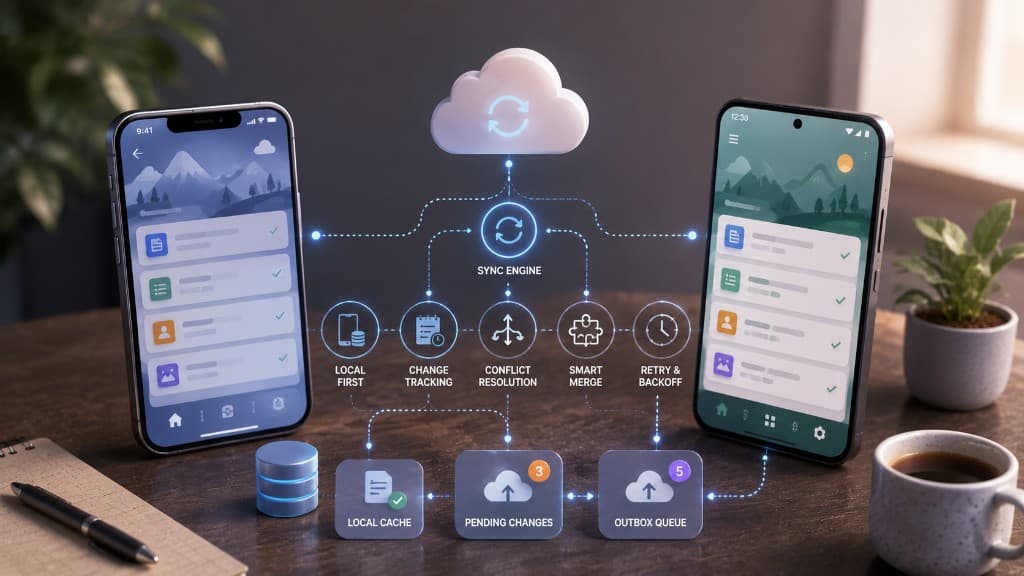
Conflict resolution, optimistic UI, and background sync strategies that keep field teams productive without a reliable network signal.
Design for disconnection first
Field teams do not experience "occasional offline" — they experience tunnels, basements, and rural routes. If your sync model assumes always-on connectivity, users will invent spreadsheets. Offline-first means local writes are durable and the UI never blocks on the network for core tasks.
We model a local source of truth with a sync engine that uploads and reconciles when connectivity returns. The server remains authoritative for conflicts, but the device must keep working alone.
Expose sync queue depth in a diagnostics screen for support. “The app feels stuck” becomes a measurable backlog instead of a mystery.
Optimistic UI with honest states
Optimistic updates keep interfaces snappy, but they need visible pending and failed states. Silent failures destroy trust. Queue indicators and retry actions are part of the product, not engineering leftovers.
Idempotent APIs make retries safe. Without them, double submits during flaky reconnects create duplicate records that support cannot unwind.
Expose sync queue depth in a diagnostics screen for support. “The app feels stuck” becomes a measurable backlog instead of a mystery.
Conflict resolution strategies
Last-write-wins is simple and often wrong for structured field data. Prefer field-level merge, CRDTs for collaborative text, or explicit user resolution when two edits collide on critical values.
Document the strategy per entity type. A photo attachment can LWW; a signed inspection checklist cannot.
Expose sync queue depth in a diagnostics screen for support. “The app feels stuck” becomes a measurable backlog instead of a mystery.
Background sync on iOS realities
Background budget is limited. Batch uploads, prioritise user-visible changes, and use push or opportunistic sync windows wisely. Test under Low Power Mode and constrained networks, not only on office Wi-Fi.
Observability on sync lag and failure reasons turns "the app feels stuck" into a diagnosable queue depth problem.
Expose sync queue depth in a diagnostics screen for support. “The app feels stuck” becomes a measurable backlog instead of a mystery.
Test the network states users see
Ship with a repeatable release test rather than a final week of manual hope. Use a compact matrix of real devices, OS versions, connection profiles, and account states, then run the same critical paths on every release candidate. Watch crash-free sessions, startup time, frame timing, sync delay, and battery use after rollout; support tickets alone arrive too late. Feature flags and remote configuration can reduce blast radius, but they need a tested fallback. The best mobile release is not the most animated demo — it is the one field users can trust when conditions are inconvenient.
Reliable mobile experiences are designed around interruption. A user may open the app on an older device, lose a signal during a save, deny a permission, background the process, and return hours later expecting their work to remain clear. Make the domain action durable independently of the screen, expose pending and failed states honestly, and use stable identifiers so retries cannot create duplicate records. Exercise release builds on physical devices across the connection and account states that matter, including constrained networks and low-power modes. Treat performance, crash-free sessions, sync delay, and battery use as product measures after release. A staging environment with a perfect connection cannot prove this behavior. Teams earn trust by making the recovery path visible: what saved locally, what will retry, when the user needs to act, and how support can diagnose the issue without guessing.
Mobile quality also depends on communication. Give support and operations enough context to understand a device state without collecting unnecessary personal data: app version, platform version, connection class, queue state, and a correlation identifier are often enough. Keep migrations and local storage changes backward-compatible during staged rollout, because users update at different times. Make slow work cancellable where possible and do not promise a background action the operating system cannot guarantee. Review app-store feedback alongside instrumentation, then turn recurring failure patterns into a test case. These habits produce a mobile product that treats unreliable conditions as normal operating conditions, which is what users need from field, commerce, and account-management apps.
Expose sync queue depth in a diagnostics screen for support. “The app feels stuck” becomes a measurable backlog instead of a mystery.
Test reconnect like a first-class journey
Add automated and manual tests for airplane mode, flaky LTE, Low Power Mode, and conflict cases. Offline-first is not complete until field users can see pending, failed, and merged states without calling support.
That discipline is what makes mobile app development trustworthy for teams who work where signal fails.
Expose sync queue depth in a diagnostics screen for support. “The app feels stuck” becomes a measurable backlog instead of a mystery.
Document conflict strategy per entity
Last-write-wins is simple and often wrong for structured field data. A photo attachment can LWW; a signed inspection checklist cannot. Write the merge rule per entity type before coding the sync engine.
Expose sync queue depth in a diagnostics screen for support. “The app feels stuck” becomes a measurable backlog instead of a mystery.
“Sustainable delivery comes from making the important trade-offs explicit, measurable, and recoverable.”
Checklist
- Physical-device release journey defined
- Offline, interruption, and retry states tested
- Stable idempotency keys used for writes
- Platform permissions and background limits reviewed
- Crash, performance, and battery signals monitored
- Fallback and support recovery path documented
Muhammad Talha Zubair
CTO & Managing Director
Owns technical direction and delivery across web, mobile, and AI integration work. Sets architecture standards and keeps product engineering close to the builders.
Let's build something
remarkable
Whether you need a web or mobile app with AI integrations, blockchain work, or a conversation about our AI products — tell us what you're building and we'll respond fast.
Blog questions
How we write, how often we publish, and how you can contribute or stay in the loop.
Blogs are written by Automative Tech’s engineering leadership — Muhammad Talha Zubair, Bilal Hassan, and Umar Khalid — based on production web, mobile, AI integration, and blockchain work.
We lead with custom web and mobile delivery with AI integrations — Next.js, React, React Native, Flutter, and LLM features. Selected posts also cover blockchain, AI products, and cloud when they support shipping real products.
A few deep pieces per month. We prioritize substance over cadence.
Yes with attribution and a link back to the original. For syndication, contact us for a simple agreement.
Occasionally, when the author has real production experience. Pitch a short outline via the contact form.
Follow the social links in the footer, or contact us to ask about engineering notes updates.